

AeroGuard-software
for optimal management of your indoor air quality
The AeroGuard is much more than just an air quality monitor. Thanks to its highly accurate sensors and programmable relay outputs, it can automatically control universal air cleaning or air handling systems. This ensures you are always protected from working in a polluted or uncomfortable environment, without having to worry about it.
The user-friendly AeroGuard software gives you maximum control over the air quality in your workspace. Discover the possibilities of the free app and the comprehensive dashboard here.
Free app: instant clarity about your air quality, anywhere
With the free AeroGuard app, you always know the status of your indoor air quality. You can view real-time measurement data directly on your phone or tablet. The app stores up to 30 days of data and can be used with up to three accounts. You can also easily select which primary parameter you want to display on the LED ring.
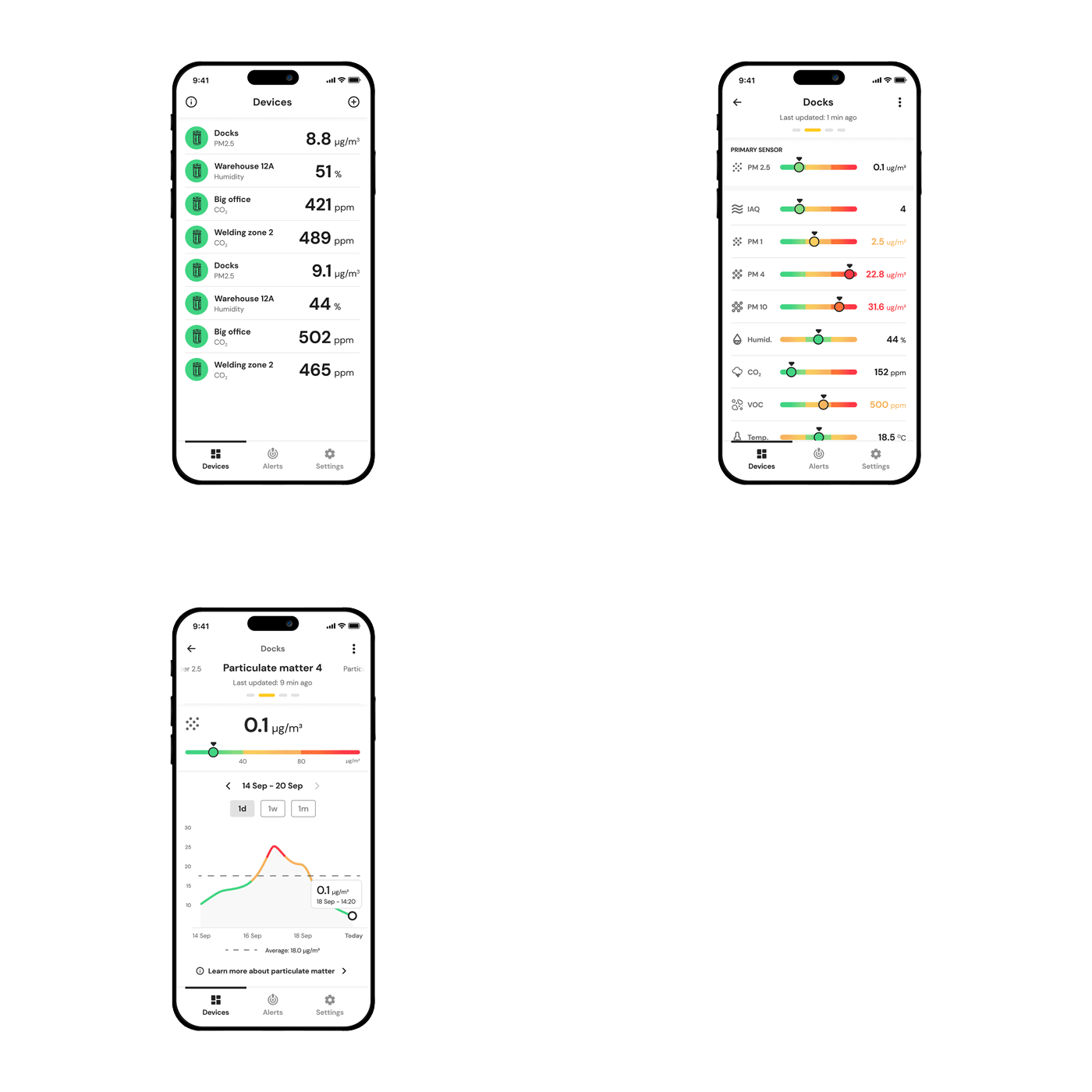
Available for iOS and Android
30 days of historical data
Clear graphs and trend overviews
Device settings you can adjust in the app:
- Preferred threshold values
- Primary parameter shown on the LED ring
- Control of potential-free contacts (relay outputs)
- Notification preferences

Premium subscription for your AeroGuard
To access all dashboard features, you need a premium subscription.
Pricing:
- Europe: €50 per month or €500 per year
- USA: $60 per month or $600 per year
- Canada: C$70 per month or C$700 per year
You can arrange your subscription via: myplymovent.com
Log in with the same account you use in the app and activate a subscription for the AeroGuard dashboard.
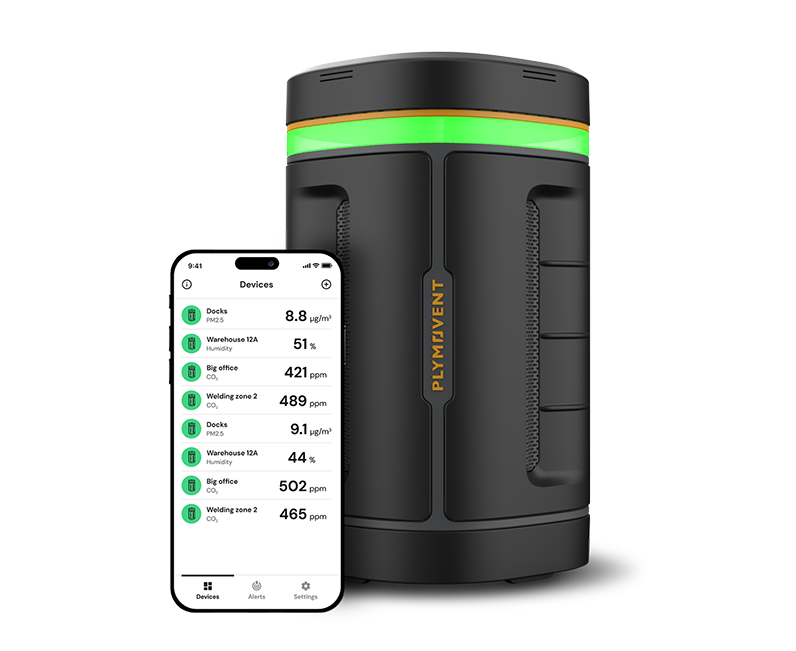
Automatically managing air quality with your AeroGuard
You can connect your AeroGuard to HVAC systems. The device includes two programmable relay outputs that can activate universal air purification or air treatment systems. For example, you can connect it to a filtration system, ventilation system, or climate control system for temperature and humidity.
By default (via the free app, without premium account), the two outputs respond to the primary parameter displayed on the LED ring. You select this parameter in the app.
If the value turns yellow, one output is activated.
If it turns red, the other output is triggered.
You decide which systems the AeroGuard controls.
With the online dashboard (premium subscription), you gain advanced configuration options. You can define which parameter triggers the relay outputs and at what threshold a system should be activated.
You can also connect your AeroGuard to myplymovent.com, the platform for all Connected Plymovent systems (currently AeroGuard and ControlPro Connect). From there, you can centrally manage the device and access documentation such as datasheets, manuals and brochures.
AeroGuard support for audits and reporting
The AeroGuard continuously records all key air quality parameters and securely stores the data. Through the dashboard, you can easily generate reports and analyses for audits, certifications and occupational health documentation. You always have reliable indoor air quality data available for inspections or compliance checks.
Supporting compliance with occupational health and safety standards
The AeroGuard helps support regulatory compliance by measuring and logging key parameters such as CO₂, particulate matter, temperature, humidity and noise levels. The dashboard gives you insight into current environmental conditions, as well as trends over time.
This data supports risk assessments and demonstrates compliance during audits or inspections.
Note: The AeroGuard provides insight and supporting evidence, but it is only one part of overall compliance documentation. In some industries (such as laboratories, industrial environments or healthcare), specific legally required measurements may need to be performed periodically by certified parties. The AeroGuard does not replace these mandatory inspections. It supports continuous monitoring to help prevent surprises during official testing.
Supporting WELL, BREEAM and RESET certifications
The AeroGuard supports certification processes by continuously and accurately measuring indoor air quality. You can easily generate structured reports required for certifications such as WELL, BREEAM and RESET. This helps achieve and maintain sustainability and wellness certifications for buildings.

Connectivity & cybersecurity
What connectivity options does the AeroGuard support?
The AeroGuard can be connected both wired and wirelessly.
It supports:
- Ethernet (RJ45) for stable, fixed connections to corporate networks
- WiFi (2.4 GHz, 802.11 b/g/n) for wireless internet connectivity
Note: Bluetooth (BLE) is only used for initial setup via the mobile app.
Which networks are supported?
The AeroGuard supports standard industrial and corporate networks via:
- Ethernet (LAN)
- WiFi 2.4 GHz (802.11 b/g/n)
Note: 5 GHz WiFi is not supported.
For industrial environments, a wired Ethernet connection is recommended for maximum reliability and security.
How do I configure the AeroGuard for the first time?
Setup is simple via the mobile app (iOS and Android). The app guides you step-by-step through connecting the AeroGuard to your WiFi network or wired LAN connection.
Does the AeroGuard require an internet connection?
The AeroGuard can operate without internet, but an active connection is required to view data in the app or dashboard.
If offline, the device continues measuring and signaling (via LED ring and relay outputs), but data is not transmitted to or stored in the cloud. Once the connection is restored, live data becomes visible again.
Does the device always need to be online?
For full functionality, yes. However, without internet the sensors continue measuring locally. The LED ring and relay outputs remain operational according to configured thresholds.
Note: Without internet, data is not transmitted or stored and is not visible in the app or dashboard.
What happens if the internet connection is temporarily lost?
Measurement values from that period are not available in the cloud and cannot be displayed later. However, the AeroGuard continues operating normally. The LED ring and relay outputs remain active. Once the connection is restored, the device automatically resumes sending live data.
Are data encrypted during transmission and storage?
Yes. All communication between the AeroGuard and cloud servers is secured via TLS encryption (HTTPS, port 443). Data is stored and processed in accordance with GDPR guidelines. The system has also been assessed against ETSI EN 303 645 v2.1.1, the European IoT cybersecurity standard, which includes requirements for data protection and secure software updates.
Are firewall or proxy adjustments required?
In most cases, no special firewall changes are required. The AeroGuard uses standard HTTPS traffic via port 443, which is typically already permitted in corporate networks. All communication with cloud and firmware update servers takes place through this secure encrypted connection.
Are special network ports required?
Yes. Only port 443 (HTTPS) must be open for outbound traffic. All data communication and firmware updates use this port with TLS encryption. No additional ports are required.
